How Sales Teams Can Use AI To Stop Losing Leads

Head of Marketing, Cirro · Ottawa, Canada
Ask a sales manager how many leads they lost last quarter and you will get a well-prepared number. Ask them where those leads went and the answer moves into slightly more vague territory.
This shift is the whole problem. Teams can count the loss without seeing the leak.
Key takeaways
- Most lead loss isn't dramatic. It's slow, bad timing, stale data and a follow up that was forgotten.
- Sales teams use AI daily for drafting and research but then stop at the CRM.
- A chatbot with CRM access answers only what you ask. A CRM native agent watches what you didn't think to ask.
Sales Teams Use AI Everywhere Except Their Own CRM
This is a pretty consistent pattern. Reps use AI to draft cold emails. Managers use it to rewrite proposals. Someone on the team uses it to summarize a long RFP or think through a pitch. It's part of their workday.
Then it stops at the CRM door.
Personal productivity is a low-stakes place to experiment. If a draft is wrong you rewrite it and nobody needs to know. Business-critical systems don't offer that. Your CRM holds client data, live deals and real numbers.
That's probably why it feels safe to keep your CRM manual but this means the system holding every lead, every deal and every scrap of context is the one system entirely running on human memory and attention. That's also where you are losing your leads. Beyond implementing technology, it highlights a placement and adoption gap. Your AI is deployed where the risks are low but that's not where your leads are.
Why AI Makes Sales Teams More Productive Instead of Replacing Them
The jobs question comes up in the first ten minutes of every one of these conversations so let's address it head on.
Nobody is buying from your CRM. A prospect spending real money wants a person who understands their plant floor. This is real human experience and it doesn't get automated or redundant.
What gets automated is the work between conversations. Logging the call. Updating the stage. Pulling a report to work out which accounts have gone quiet. Chasing down a missing phone number. Writing the follow-up summary that should have taken four minutes and took twenty.
None of that is selling. All of it determines whether the selling ever happens.
That's the amplifier argument, and it's more concrete than it usually gets stated. A rep with 200 open leads can hold maybe 30 in active memory. The other 170 rely on the rep remembering to look. AI doesn't sell those 170. It surfaces them when it needs attention with all the context intact.
We know that reps spend under a third of their time actually selling, with the rest going to admin and data entry. Move a chunk of that back and get two things. More hours pointed at prospects and better insights into which prospects deserve those hours.
Which reframes what a lost lead actually is. When we go through a client's closed-lost records, very few of them died because a rep handled the conversation badly. They died because the conversation happened late, or happened without a piece of context sitting in the system, or didn't happen at all. That's a coverage problem. Coverage is a volume problem. Volume is exactly what software is for.
AI CRM Integration vs AI Agents: Why Connecting AI to CRM Isn't Enough
There is a distinction between using AI to stop losing leads and using AI to feel productive.
Connect an LLM to your CRM through something like MCP and you get a genuinely useful setup. Ask it which deals closed last month and it tells you. Ask it to summarize an account history before a call and it does. We've built these. They work, and for analysis they're often the fastest option available.
Read about how we saved 15+ hours by connecting Zoho CRM to Claude via MCP
But the context is partial by design. It retrieves what you ask for, when you ask for it. It has no memory of your pipeline between conversations and no view of what changed while you weren't looking. If you don't think to ask about the lead that went cold, it will never mention the lead that went cold.
That's fine for answering questions. It's useless for prevention, because the leads you lose are by definition the ones you weren't thinking about.
An agent that lives inside the CRM works the other way around. It has the full lead and deal history because it is part of the system holding it and it runs continuously rather than on request. It flags the deal that is decaying, the lead that scores high and hasn't been touched in three weeks, and the record missing the one field a rep needs to make contact.
7 Ways AI Can Help Your Sales Team
Each of these seven things maps to a specific place that affects leads.
1. Using generative AI to setup and personalize your CRM
Some of the lead loss we find is not even an AI problem, it's a setup problem. This means fields that don't match how your business actually qualifies leads. Stages named after a sales process that you don't even use anymore. Forms that just capture email and nothing else.
Generative AI has made the fix much faster. Describe the process you actually run and get a working layout, field structure, and stage logic back almost immediately instead of a three week configuration plan. Same for outreach templates that pull real record data instead of a couple of merge fields.
It changes how you get the information out, too. Instead of building reports to find answers to your questions, you can just ask the questions. For example, which accounts in Ontario haven't been contacted in the last month. This is an important time and effort saving change which opens up a lot of possibilities.
For Zoho CRM: With Zoho's own AI assistant Zia, you can describe your sales process in plain language and Zia builds the fields, layouts and email templates to match and then answers pipeline questions conversationally instead of sending you to make reports.
2. Using AI Prediction To Identify Which Leads To Pursue
A rep's sense of which deals are alive is built on recency. The deal they spoke about yesterday feels warm. The one from three weeks ago feels dead, whether or not it is.
Predictive scoring fixes the ordering problem. The model reads engagement patterns, response times, source quality, and history across your closed-won deals, then ranks the pipeline by likelihood rather than by what's top of mind. Working every lead with equal effort is the same as working none of them properly when the list runs past a hundred.
Harvard Business Review's lead response research found the odds of qualifying an inbound lead drop off sharply within the first hour of contact (Oldroyd, HBR, 2011). Fifteen years on, most teams still route inbound by whoever's free.
For Zoho CRM: Zia scores every lead and deal against your own historical win data and flags the high value ones that need attention even before you notice.
3. Using AI Sales Forecasting For Better Data
Bad forecasting loses leads indirectly which is why it rarely gets blamed. When the number looks healthy, nobody works the middle of the pipeline. When it's inflated by three deals a rep feels good about, the twelve real ones underneath get no attention until the quarter is already short.
AI forecasting runs on close rates by stage, deal age and the actual velocity of your pipeline rather than a confidence rating in a dropdown. It'll tell you the quarter is $60,000 short in week three when there's still time to work the leads that would close the gap.
For Zoho CRM: Zia forecasts from your real pipeline behavior and flags deals whose stage no longer matches how they're actually moving.
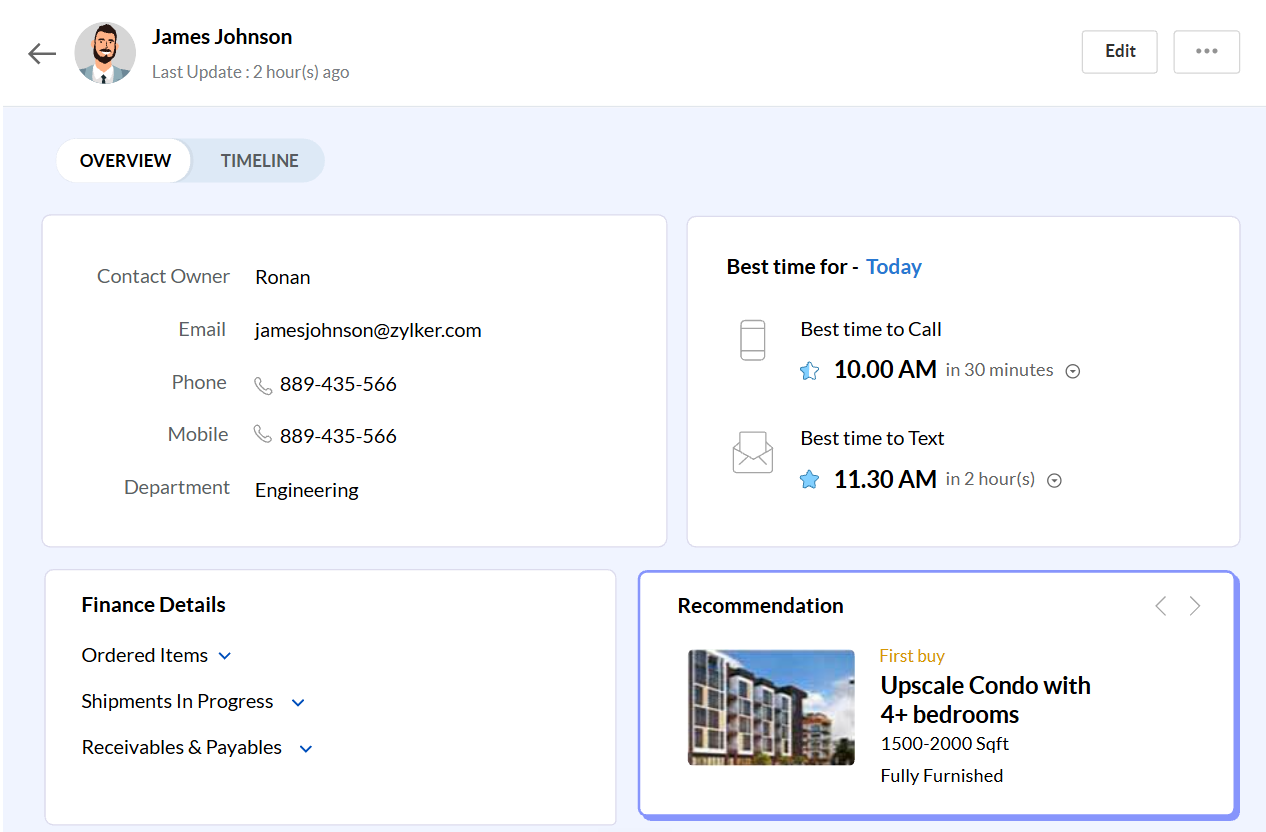
4. Using AI To Find The Best Time To Contact A Lead
Some prospects answer at 8am. Some are on onsite until four. A rep calling at the wrong hour twice gets a lead marked unresponsive that was never unresponsive, just unavailable.
AI reads the response history on each contact across email opens, replies and answered calls, and tells you when that specific person actually engages. It's a small adjustment with a direct effect on response rate and it's one of the more common reasons a good lead turns into a closed-lost with no real explanation attached.
For Zoho CRM: Zia recommends the best time to call or email each contact based on when they have actually responded before.
5. Using Data Enrichment For Better Lead Context
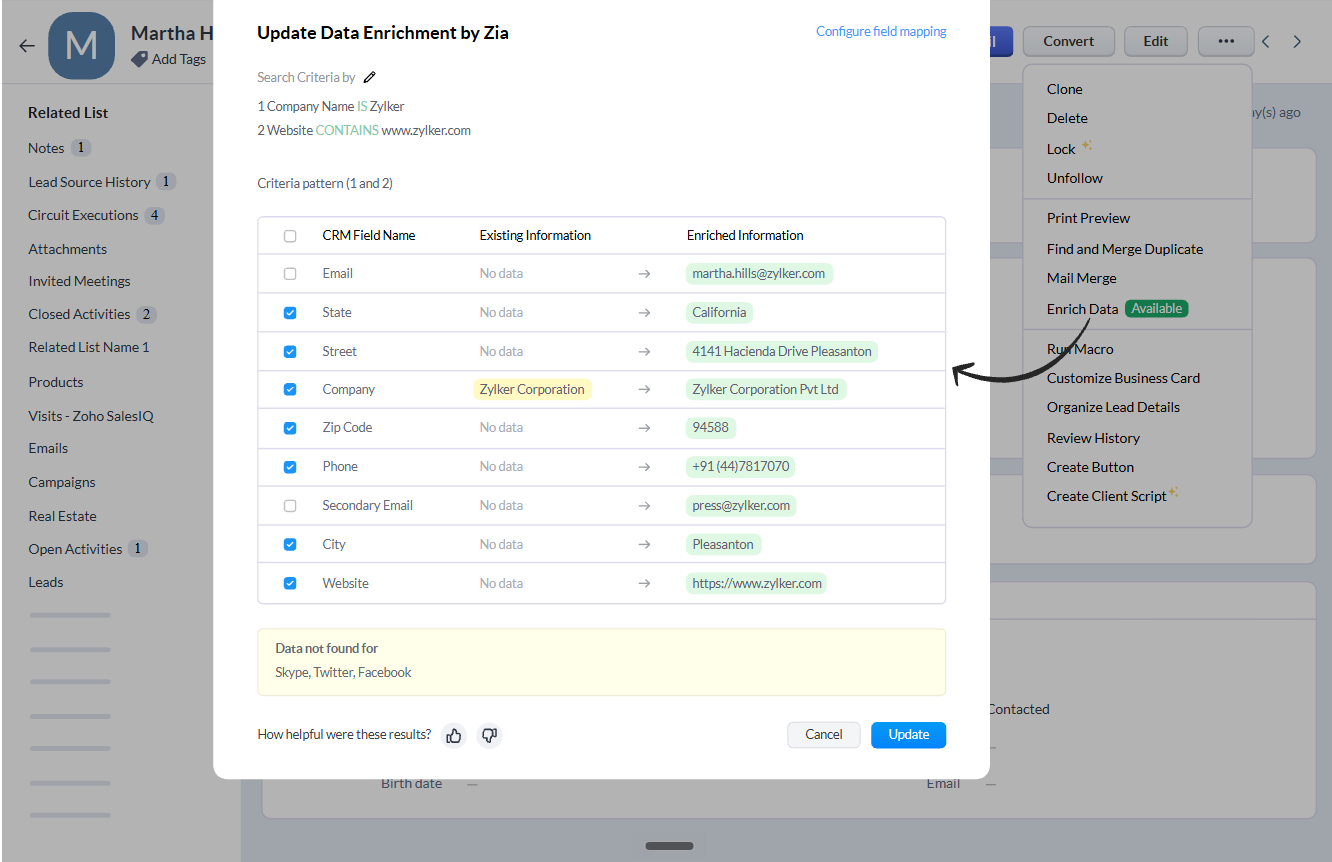
You can't work a lead you can't reach. A record with a company name, a generic info@ address and nothing else is functionally a dead lead no matter how good the fit is. The manual fix is a rep spending fifteen minutes on research per record, which means it happens for the leads that already look promising and nowhere else.
Enrichment fills the gaps automatically. Company size, industry, role, direct contact details, matched against public sources and appended to the record. Deduplication runs alongside it, because the second version of this problem is three partial records for one company, each worked by a different rep, none of them complete.
For Zoho CRM: Zia enriches lead and account records with company and contact data automatically, and flags duplicates before a deal is split across three records.
6. Using AI Automation To Reduce Manual Work
Nothing gets lost during a task. Things get lost between them. Call ends, follow-up email doesn't get sent. Quote goes out, nobody sets a reminder. Lead comes in Friday at 5pm, assignment happens Monday afternoon.
Automation closes the handoffs. Route the lead the moment it arrives based on territory and score. Trigger the follow-up sequence when a call is logged. Escalate a deal that's sat in one stage past its normal duration.
Anomaly detection is the part manual process can't replicate at all. A drop in activity across a territory, a stage that's suddenly taking twice as long, a source that stopped converting. A person reviewing the pipeline once a week won't see those but a system watching it continuously will see it.
For Zoho CRM: Zia suggests workflows based on patterns in your own data and flags anomalies in pipeline activity before they touch your revenue.
7. Using AI On Sales Calls To Capture What Reps Miss
This one costs more and usually slips under the radar. A prospect names their real objection on a discovery call. The rep hears it but doesn't write it down. Now, a critical piece of information is entirely dependent on their memory and recall. A few weeks later when the deal dies, nobody knows the real reason.
Call intelligence transcribes and analyses the conversation, pulls out objections, competitor mentions, next steps, sentiment and adds it to the deal record. The rep on the call gets to now to focus entirely on listening instead of typing notes. The manager doesn't have to sit through 40 hours of calls to find out patterns.
For Zoho CRM: Zia transcribes and analyses sales calls, extracting objections, sentiments and next steps straight to the deal record.
For a broader look at what this means across your whole business, see what running Zoho on AI looks like.
Frequently Asked Questions
Which Zoho CRM plan do we need to use Zia?
Zia capabilities are spread across editions, with prediction, scoring and call intelligence concentrated in Enterprise and above. Many teams already hold a license that includes more than what they are using. Check what's in your plan before assuming an upgrade is required.
How is this different from connecting ChatGPT or Claude to our CRM?
An external assistant answers questions you ask about your CRM. A CRM-native agent runs continuously against the data whether or not you ask.
How long before AI lead scoring is accurate?
Zia needs closed-won and closed-lost history to learn from, so accuracy depends on volume more than time. Teams with a couple of years of clean CRM data see useful scores quickly. Teams with messy history need the data cleaned first, which is usually the real project.
What if our CRM data is a mess right now?
That's the normal starting point, and it's the argument for enrichment and deduplication before scoring. Cleaning up records is the least interesting part of this work and the part that determines whether anything after it works. Read more in our Zoho implementation guide
Will AI in our CRM reach out to clients without us approving it?
Only if you configure it that way. In Zoho CRM, Zia's suggestions and drafts sit behind an approval step by default. Automation that sends client-facing communication is set up deliberately, rule by rule, and most teams we work with keep a human approval on anything outbound for the first few months.
How Small Businesses Can Start Using AI To Stop Losing Leads
The instinct when leads are leaking is to add people. Another SDR to work the top of the funnel, another coordinator to chase follow-ups.
For a small team, that usually doesn't fix it. More people working a system that drops leads means more leads dropped, just faster. And a hire is not a small experiment.
This isn't a budget problem either. What changes the number is putting AI inside the system where the leads already live. Not alongside it, and not connected to it through a tool that answers questions when asked. Inside it, running against the full history, surfacing what nobody thought to look for.
That's the amplifier argument in its practical form. The four-person team stays four people. What changes is how many of their 900 leads get real coverage, and how much of the week goes to selling rather than keeping the records straight.
If you're on Zoho CRM, a good share of what's described above is already in your license. Zia isn't an add-on you buy, it's a set of capabilities sitting in an edition you're probably already paying for and not using. The gap is usually configuration.
So the honest starting point is a look at where your leads are actually leaking today. Which of the seven above is costing you the most. For a deeper look at fixing the lead side specifically, see 5 ways Zoho CRM leads can get more of them.
At Cirro, we do that as a free CRM audit. We go through your pipeline data, find where records are stalling, and tell you which Zia capabilities are already available in your current setup. And if the answer is that your setup is fine, we'll say so.
Losing leads you can't explain?
Book a free CRM audit with CirroCraft. We'll show you where your pipeline is leaking and which Zia capabilities you already own.
Book a Free Consultation