
Businesses buy Zoho to run their operations. The pipeline, the support queue, the books, the reporting nobody has time to build by hand.
That has always been true. What has changed is what running it well now requires.
In 2026, running Zoho well means running it on AI. Not as an add on you toggle on later. As a default expectation, the same way you would assume a CRM has a mobile app or a support desk has ticket routing. If the intelligent layer is not there, the system feels behind before you even start.
This shift matters because AI is only as good as what it sits on top of. It is an amplifier. Clean data and a well structured setup get sharper with AI running through them. A messy CRM with inconsistent fields and bad data does not get magically fixed with AI.
Why Running Zoho On AI Matters Now
Three things changed at once and none of them are slowing down.
Buyer and customer expectations moved first. People expect a fast, personalized and real time response from your sales team, and from the software you run them on. A CRM that cannot tell you which deal needs attention today, without you building a filter, already feels dated.
Competitive pressure followed. The businesses catching signals earlier, a deal going cold, a support ticket trending negative or a customer about to churn, get to act on them earlier. That is not a marginal edge. Over time it compounds into a different business.
The part people underestimate is the data itself. Every quarter you run without an intelligence layer, patterns pile up in your CRM and your support logs that nobody is looking at. They do not disappear. They just sit there, invisible, until a tool finally surfaces what should have been obvious eighteen months earlier. Delaying AI is not neutral. It is letting your own data go stale in place.
There is also a plainer, less exciting reason. Cost. Less time spent building manual reports, faster decision cycles and fewer hours lost to the kind of work AI now does in seconds.
This is now the new baseline.
What Is Zia In Zoho?
Zia is Zoho's native AI and the distinction that matters is where it lives. It is not a chat window pinned to the corner of your screen answering generic questions with no connection to your data. It is threaded through your CRM, Desk, Books, Analytics and the rest of what Zoho runs, and works off the same records your team handles every day.
That is the difference between a chatbot and an AI layer. A bot answers questions. Zia works from your actual pipeline, your actual tickets, your actual invoices and surfaces predictions, recommendations and automations grounded in what your business is doing.
There is another part around accessibility. You can ask Zia questions in plain language. Which deals are stalling, what a customer's sentiment looks like across their last three tickets and why revenue dipped in a certain region last month. No report builder, no filter logic, no waiting on whoever owns the dashboard.
Even a non technical person on the team gets a straight answer without wading through all the data. Beyond mere convenience, this is what makes the intelligence layer usable by the people who actually need it.
What Does The AI Layer Need To Work?
AI amplifies what is already there. That is the honest version of the pitch and it cuts both ways.
We wrote about connecting our own CRM to Claude earlier this year and the biggest change was not AI. It was how we thought about our own setup afterwards. If your fields mean something and your data is clean, AI can use it well. If it is a mess, you just get noise back, just faster noise.
That is the real line between a system of record and a system of intelligence. A system of record stores what happened and you go and find it when you need it. A system of intelligence tells you what is happening now, what is likely to happen next and what to do about it.
Zoho can be either for your business. The AI layer is what pushes it from one to the other, but only if what is underneath can support the weight.
This is also where a Zoho implementation partner earns their place in the conversation. Not to sell you AI features but to get the structure underneath right first.
Zia In Zoho CRM For Growing Sales Teams
Zoho CRM is the clearest place to see Zia working because sales have always run on signals that used to take reps hours to piece together.
Lead and deal scoring is the starting point. Zia scores every record against your own historical conversion patterns and not a generic industry benchmark. A high score lead reflects what has closed for you before. Win probability builds on that and gives reps a live read on which deals are likely to close and which ones are dying.
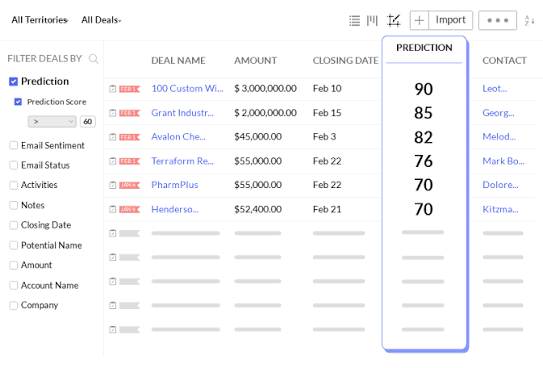
Anomaly detection catches what a busy rep misses. A deal that has gone unusually quiet. A pattern that breaks from what normally happens at this stage. Best time to contact recommendations use response history to tell a rep when a specific prospect is actually likely to pick up or respond instead of guessing based on habit.
Put together, this reframes what a sales team spends its morning on. Instead of scanning a pipeline view and guessing where to start, a rep opens a list ranked by what matters.
Picture a manager opening their pipeline on a Monday. Without Zia, that is 40 open deals scanned in stage order, hoping the ones that need attention stand out. With Zia, it is a short list. Three deals with a dropping win probability, two contacts flagged as best reached before noon and one anomaly worth looking at before the forecast call.
It is the same pipeline but a different starting point.
Hear What Your Customers Are Saying With Zia In Zoho Desk
Support teams sit on more customer signal than almost anyone else in the business and most of it goes unread.
Sentiment analysis reads the tone of a ticket, a chat or an email as it comes in, not after a CSAT survey weeks later. A ticket that reads as calm on the surface but carries real frustration underneath gets flagged before it escalates. Call summaries do the tedious part automatically, turning a 15 minute call into a few lines an agent or manager can scan.
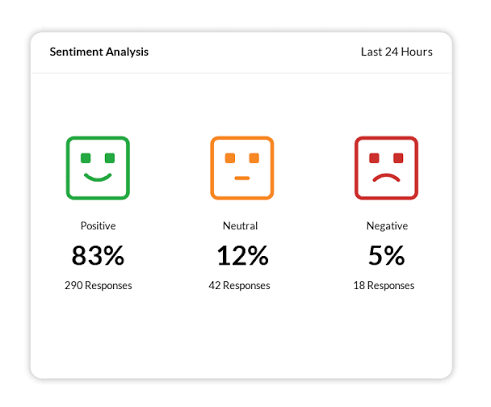
The voice of customer angle is the one that gets underused. Individually, tickets can look like isolated complaints. Pulled together across hundreds of them, they show you what is breaking in your business, a pattern no single ticket would reveal on its own.
None of this replaces the agent. It moves the manual work around the conversation, summarizing, tagging and flagging, so the agent spends their time on the part that needs a person. You can see how this connects to AI chatbots in Zoho Desk.
The old process meant reading tickets twice. Once to solve the customer's problem and then again at the end of the month to write a summary nobody had time to read closely anyway. Sentiment tagging and call summaries collapse that second pass into something already done by the time the ticket closes.
Ask Questions With Zia In Zoho Analytics
With Ask Zia, you can query your business data the same way you would ask a team member.
"Which region underperformed last quarter and why" gets you an answer with context immediately instead of having to interpret a spreadsheet. This is a real benefit because dashboards have a limitation. Someone has to already know which question to ask and how to build the view that answers it. Automated insights change that by surfacing what is unusual or worth attention on its own, before anyone thought to look for it.
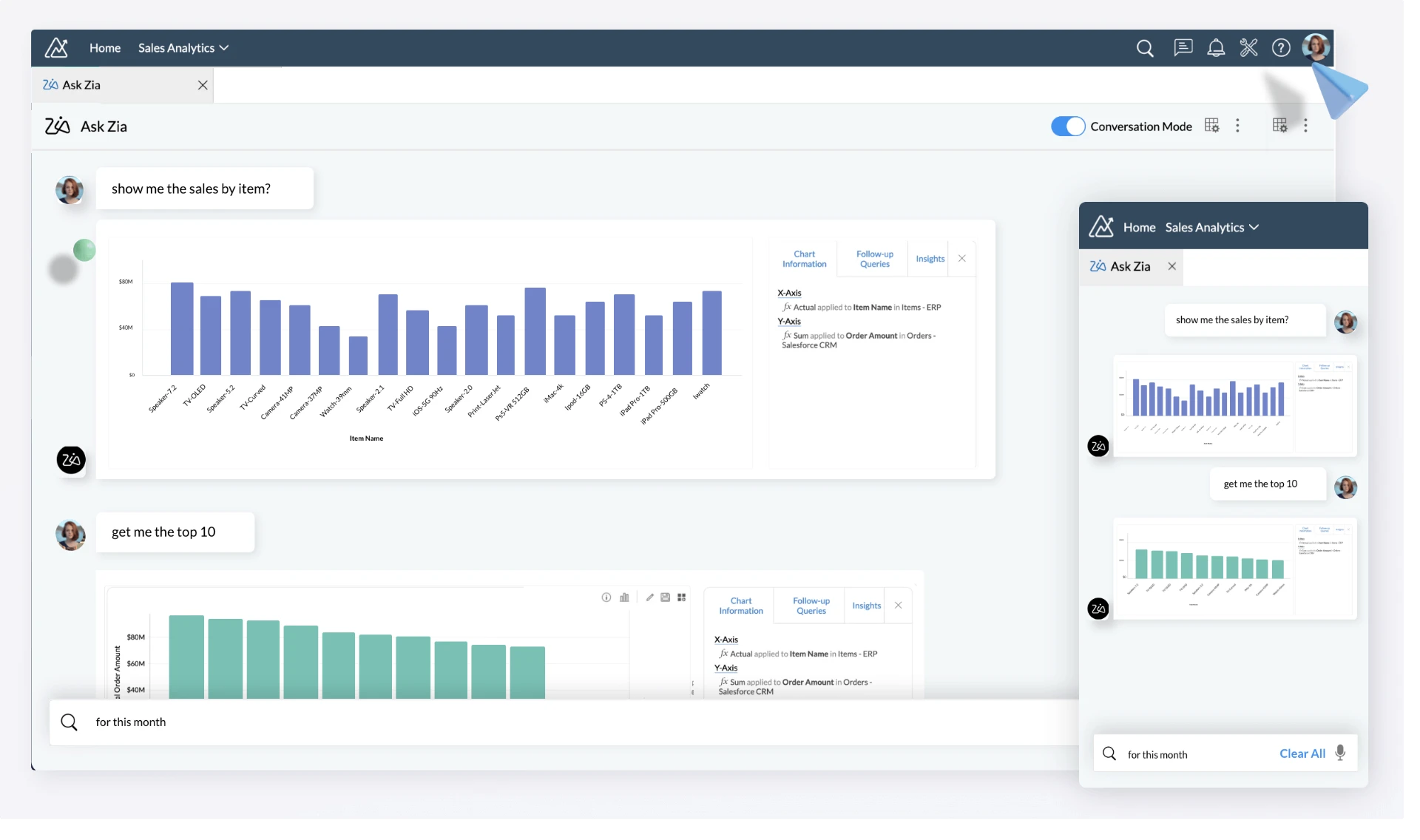
This is also the piece that democratizes data access. Not by making everyone a data analyst but by removing the requirement to be one. The finance lead, the ops manager and the rep all get a direct line to their own numbers without routing through whoever is doing the reporting.
It also changes who asks the questions in the first place. When getting an answer meant waiting for that Friday meeting, people stopped asking questions they wanted answered. With Zia, the volume of questions a business actually asks of its own data goes up, not just the speed of answering them.
What Zia Won't Do For You
None of these abilities make Zia a replacement for judgment.
Zia scores, predicts and summarizes based on patterns in your own historical data. It will not tell you why a competitor undercut you on price or whether a client relationship needs a phone call instead of an automated nudge. It is reading what has already happened and what usually follows. The read on a nuanced, one off situation still belongs to the person behind the screen.
It also needs volume to be reliable. A team with a handful of deals a month and thin historical data gets a lead scoring model with not much to learn from. The predictions get sharper the more your CRM has actually recorded. That is another argument for getting the setup right early rather than bolting AI onto years of inconsistent data entry.
Knowing the edges matters more than a features list. A tool that is oversold gets distrusted the first time it is wrong. The tool you understand the limits of gets used correctly and earns its place in your tech stack.
If Your Business Is Already Running On Zia
If lead scoring and sentiment tagging already feel routine, the next big gain is not a new feature inside one app. It is connecting the AI layer across your Zoho apps so questions can touch CRM, Desk and Books at once instead of one at a time.
That is the direction we are heading. Instead of asking Zia about a deal, then separately checking Desk for that account's open tickets and then Books for their payment history, the useful version pulls all three into one answer. Is this account healthy enough to expand given their pipeline, support load and billing status. Zoho already holds all of this data under one roof. Zia takes it to the next level, and Zoho MCP extends that reach further.
The other important aspect is proactive flags instead of reactive answers. Right now, most of what is described here still requires someone to ask. The next version surfaces the deal going cold, the ticket trending negative or the invoice slipping past due date before anyone thinks to look. Some of that is already live with Zia and it changes the posture from checking on your business to being told when something in your business needs your attention.
What's Next With Zia?
Do not set everything up at once. Pick the one place the manual work is heaviest and start there.
If your sales team is spending real time every week deciding who to call, start with lead and deal scoring in your CRM. If support is drowning in tickets with no time to spot patterns, start with sentiment analysis and call summaries in Zoho Desk. If the same person builds the same report every month by hand, start with Analytics.
Run this for a month against real data before deciding whether it is working. Zia gets better as it learns more about your actual history, and a month gives you enough signal to see whether the recommendations match what your team already knows intuitively. If they do not, it is almost always a data quality question.
Frequently Asked Questions
What is Zia in Zoho?+
Is Zia the same as a chatbot?+
Do I need clean data before AI is useful in Zoho?+
Is Zia included in my plan with Zoho or is there an extra cost?+
How long before I start seeing results with Zia?+
Do small businesses need Zia?+
What's the difference between Zia and just connecting ChatGPT or Claude to my Zoho data?+
How Do You Get Started With Zia In Zoho?
Almost everybody using Zoho has experimented with Zia in some form. It is not whether they use it but how deep that layer runs, whether it touches one tool or five, whether it is answering questions or just sitting there unused in a settings menu nobody opened.
The question that needs to be asked is not "should we have AI". That is not really a question anymore. It is worth considering how much of your business operation Zia actually reaches and whether the data underneath is in shape to make that reach meaningful.
Wondering what Zia could look like inside your actual Zoho setup?
Get in touch and we will walk you through what is possible with the AI layer across your CRM, Desk and Analytics.