The Complete Guide to Bigin by Zoho CRM for Small Businesses

Head of Marketing, Cirro · Ottawa, Canada
Running a small business is a full time job, probably closer to two or three full time jobs. Leads keep slipping away, data gets lost and that spreadsheet you started with good intentions has turned into a nightmare you can't trust anymore.
So that brings you here. If you are reading this, you know you need a CRM. The question isn't even which one. It's whether you can justify the cost and setup time when every minute goes toward bringing in revenue for your business.
Introducing Bigin by Zoho CRM. It's a powerful and affordable CRM specifically designed to help small businesses grow.
This guide covers what Bigin can actually do so that you can decide if it's the right choice for your business.
What Bigin Is (and Isn't)
You don't need a CRM with 700 features you will never use or an interface so convoluted that your team absolutely hates it.
Think of Bigin as a CRM that feels approachable. It focuses on the essentials that matter.
It organizes your data into Contacts, Companies, Pipelines and Activities so you have full visibility into your entire sales process. You can update contacts quickly, automate follow ups so your leads don't go cold, assign tasks to your team members and pull insightful reports to track what's actually working.
Bigin's setup skips the steep learning curve of bigger systems. It creates a great user experience that sets your team up for success from Day 1.
Introducing Bigin by Zoho CRM. It's a powerful and affordable CRM specifically designed to help small businesses grow.
Bigin is laser-focused on getting small teams big results without the overload. It can grow with your team.
What Bigin Does Well
1. Pipeline Management Made Simple
Bigin is your answer to messy pipelines where leads show up everywhere and nothing works the way you want it to. You start by defining a clear process for your sales and lay out all the stages of your pipeline. You get a 360 degree view from lead generation to the point where a deal closes. Bottlenecks stand out immediately so you can jump in and address it almost as quickly.
Your information stays exactly where you left it. Let's say you dragged a lead to the "Qualified" stage yesterday. You can add your notes, email threads and assign next steps. When you log back in, all the information is right there, primed for you to take action. There is no need to hunt for your notes or dig through emails to find what you need. You always know the status of each lead at a quick glance.
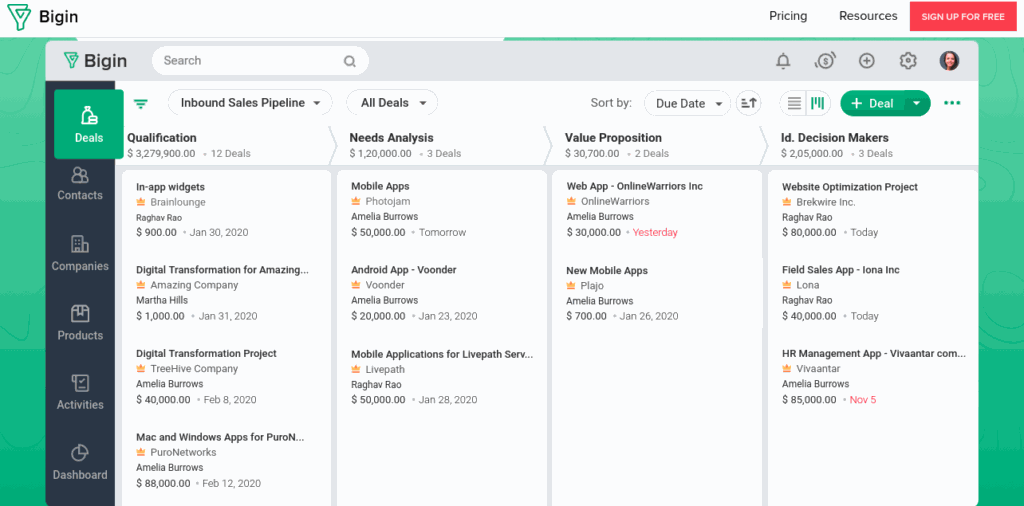
From there, Bigin helps you prioritize high performing leads. Tag the leads with the best potential based on budget, fit or any other criteria you have. They rise to the top so you can put effort where it counts.
Pro tip: Add expected close dates to every deal even if they are rough estimates. Deals without dates stay in your pipeline forever. Dates add a sense of urgency and improves your revenue forecasting.
Monitor your team's performance the same way. You can track each member's tasks, measure progress when a lead moves to the next stage of the pipeline and note which leads are stalling.
You can even manage multiple pipelines. One for new leads coming in. Another for upsells or different services offered by your business.
This setup also makes revenue predictable. You can look across your pipelines for the deals that are ready to close and calculate your monthly revenue based on average wins. Use the analytics and dashboards to tie it all together. Insights from these reports help you understand how your sales team is currently performing and how that stacks up against your goals.
2. Easy Set Up and Implementation
With Bigin, you can choose a pipeline template that matches your business needs. Whatever your sales processes looks like, you can get a template that is ready to go.
From there, you can import your contacts from that spreadsheet you have been using or add them manually. You can also link companies you have been tracking and sync your email to the platform. Your messages will start showing up right away.
The interface is clean and intuitive. Your dashboard provides an overview of the deals, activities and tasks so team members can log in and see what they need to do. The mobile app is synced to everything and provides the same user experience so you can stay on top of things even when you are on the move.
Pro tip: Train a team member in the first week to learn and help others. Having a peer champion the initiative works better than top down mandates and people ask questions they wouldn't normally.
Teams find it easy to understand and use because it works with your processes and does not turn the Bigin implementation an uphill battle.
3. Intuitive Customization in Action
You need your CRM to fit your business without drowning you in options. You can adjust the platform however it makes sense to you.
Create custom fields like "Lead Source" or "Preferred Contact Method" by picking whether it is a text, dropdown or number and adding it right next to your other fields.
Pro tip: Before adding a custom field, evaluate whether leaving the field empty has any impact on the deal. If your answer is no, you don't need it. Most teams over customize.
4. Automations That Save Time
Sales teams spend only 39% of their time engaging with prospects. They spend the rest of the time on non-sales tasks like writing emails, researching leads, attending meetings and planning calls. Automate some of the non-essential tasks so that your sales team can focus on what they do best.
Use Bigin to set rules for automation and let it run in the background as you close deals. When a lead goes quiet for a few days, you can choose an action like a reminder email or follow up call. You can even set templates for common responses like "thank yous".
Pro tip: Set workflows to auto assign tasks based on deal size and location.
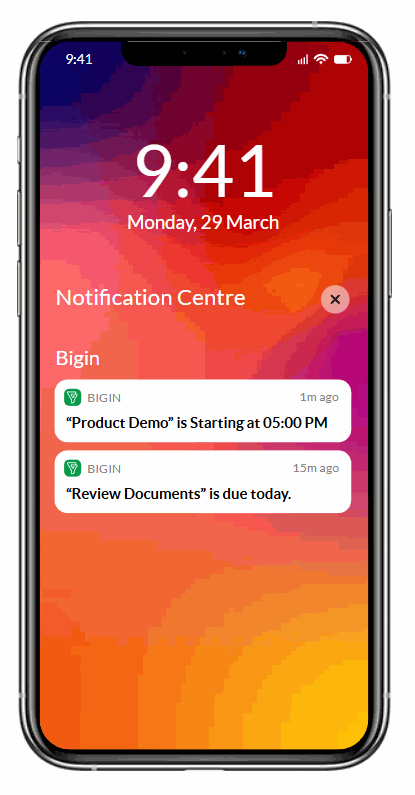
Additionally, notifications ensure that a loop is not left open for too long. You can get alerts for new activities, idle tasks or even changes in deals, even on your phone.
Workflow automations can make the routine easier, reduce errors and keep that momentum going.
5. Integrations For Your Tools
Bigin connects all the tools you already use in your business so you skip the extra work.
Zoom can be integrated for your meetings. You can log them automatically with notes and recordings. Connect WhatsApp messages from contacts and track their responses. Shopify can sync your orders and tie e-commerce sales to your pipeline.
Pro tip: Connect your most used communication tool like Outlook or WhatsApp first. Let your team get comfortable with one integration before adding another.
You can also create web forms with drag and drop fields. Submissions land directly as new contacts or deals. These are just some of the tools available in your roster with Bigin.
Your marketing efforts also benefit. You can run your email campaigns through the connected tools to engage leads.
All of this ensures there are no loose ends. You can manage multiple channels and ensure the sales process is streamlined and connected.
6. Teams That Stay Aligned
Your teams thrive when everybody sees the same picture. You can share information so no one works with outdated or incomplete data.
When you open a Contact, their entire history is visible. All the calls, emails and notes so everybody has the right context. There is also in-platform communication so you can alert team members about a new note or feedback by tagging them.
Pro tip: Implement a simple system that whoever last spoke to a contact updates a note within 2 hours and tags the next person who should take action. Make it a workflow. If no note is added within 2 hours, send an automatic reminder.
Customers feel the difference when teams work as a single system. There are no repeated calls or missed tasks. Everyone delivers faster results and creates smoother experiences.
What It Costs
Every expense counts when you are running a small business and CRMs can be expensive if they are not delivering what you need.
Bigin stands out as one of the most cost effective options in the market without sacrificing any core functionality.
Free Plan
For one user with 500 records, a basic pipeline and other essentials
Express Plan
$9/user/month
Billed annually with 50,000 records, more workflows and WhatsApp integration
Premier Plan
$15/month
Billed annually to manage 100,000 contacts and automations
Bigin 360
$23/month
Billed annually, the most powerful for fast growing teams with advanced needs
Ready To Get Started with Bigin?
The best CRM for small businesses is not a specific product but one that solves your problems without creating new ones. Bigin is the natural next step when you want control over your data, a clear pipeline and to bring your team together.
A solid Bigin implementation will helps make sure all the features are being used properly and that your team won't go back to the spreadsheet era out of frustration. As a certified Zoho implementation partner, Cirro provides implementation solutions along with Bigin support for small businesses. Our experts with 10 years of experience can take care of your custom requirements with complete transparency.
to turn Bigin into an invaluable tool for your business.
Ready to implement Bigin for your business?
Get expert guidance from certified Zoho implementation partners.